|
|
|
|
I provide this service with
no guarantees, every effort has been made to ensure that the information
is correct but you perform this entirely at your own risk, I accept no
responsibility for any loss direct or otherwise. This works on 6630, 6680 6681, N70 and N90 Download the archive from Dejan Kaljevic's own site:
You can now either run the INSTALL.bat or else perform it's actions yourself the installation simply does the following md c:\bb5_unlocker\ 'md is the dos command for make directory note the directory name must be called bb5_unlocker or the programme will not work. You can delete these files when you're done. Connection
For this program you need Fbus cable like DK5, CA43 or similar conected to one of the ports from COM1 to COM9. This must be the correct cable for the phone, not just one that fits. Edit the File C:\bb5_unlocker\logs\bb5_unlocker.cfg
using notepad or similar to the correct port for your FBUS cable. By defalut
it reads COM2: You can find your correct port my looking in your device
manager. (right click my computer - properties - hardware - device manager
- ports)
Using
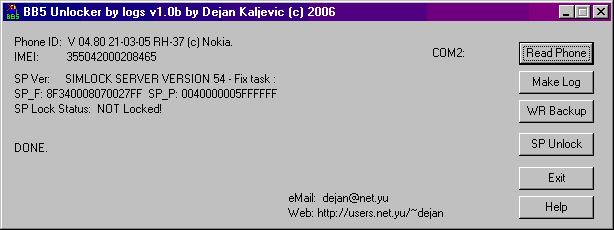
the programme BB5logunlocker.exe can only be launched if the .cfg file has been edited properly. Connect the phone with the SIM card removed launch BB5logunlocker.exe if you didn't use the bat file. Unlocking
Click 'read phone', this will display some info regarding the phone including the lock status. Click 'Back Up' do not modify this file. Click 'Make Log' this will add a file to the logs folder for your phone. Launch BB5_calc.exe this can use the log file to calculate the unlock code for your phone. This will be saved to th folder PSW. Click SP unlock - Unlocking done.
Unlock Codes From Your Network
If you got an anlock code from your network but messed up entering it via the key pad then it can be done from here. you will simply create the file in the PSW folder yourself. create a file in the psw folder called xxxxxxxxxxxxxxx_BB5.psw where xxxxxxxxxxxxxxx is your IMEI number. The contents of that file should be:
|